Atmospheric scattering explained
Code (click to expand)
/*
MIT License

Copyright (c) 2019 Dimas Leenman

Permission is hereby granted, free of charge, to any person obtaining a copy
of this software and associated documentation files (the "Software"), to deal
in the Software without restriction, including without limitation the rights
to use, copy, modify, merge, publish, distribute, sublicense, and/or sell
copies of the Software, and to permit persons to whom the Software is
furnished to do so, subject to the following conditions:

The above copyright notice and this permission notice shall be included in all
copies or substantial portions of the Software.

THE SOFTWARE IS PROVIDED "AS IS", WITHOUT WARRANTY OF ANY KIND, EXPRESS OR
IMPLIED, INCLUDING BUT NOT LIMITED TO THE WARRANTIES OF MERCHANTABILITY,
FITNESS FOR A PARTICULAR PURPOSE AND NONINFRINGEMENT. IN NO EVENT SHALL THE
AUTHORS OR COPYRIGHT HOLDERS BE LIABLE FOR ANY CLAIM, DAMAGES OR OTHER
LIABILITY, WHETHER IN AN ACTION OF CONTRACT, TORT OR OTHERWISE, ARISING FROM,
OUT OF OR IN CONNECTION WITH THE SOFTWARE OR THE USE OR OTHER DEALINGS IN THE
SOFTWARE.

Update 1 (25-9-2019): added 2 lines to prevent mie from shining through objects inside the atmosphere
Update 2 (2-10-2019): made use of HW_PERFORMANCE to improve performance on mobile (reduces number of samples), also added a sun
Update 3 (5-10-2019): added a license
Update 4 (28-11-2019): atmosphere now correctly blocks light from the scene passing through, and added an ambient scattering term
Update 5 (28-11-2019): mouse drag now changes the time of day
Update 6 (28-11-2019): atmosphere now doesn't use the ray sphere intersect function, meaning it's only one function
Update 7 (22-12-2019): Compacted the mie and rayleigh parts into a single vec2 + added a basic skylight
Update 8 (15-5-2020): Added ozone absorption (Can also be used as absorption in general)
Update 9 (6-5-2021): Changed the ozone distribution from 1 / cosh(x) to 1 / (x^2 + 1), and removed the clamp, better integration is planned
Update 10 (6-5-2021): Changed the integrator to be a bit better, but it might have broken it a bit as well (and it's not 100% done yet)
Update 11 (18-5-2021): Changed the integrator again, to fix it, because apparently it got worse since last update
Update 12 (19-5-2021): Found a slight issue at certain view angles backwards, fixed with a simple max
Update 13 (Planned): Change the integration again, according to seb hillaire: transmittance + total instead of optical depth and total
                     See Enscape clouds, this hopefully improves the quality

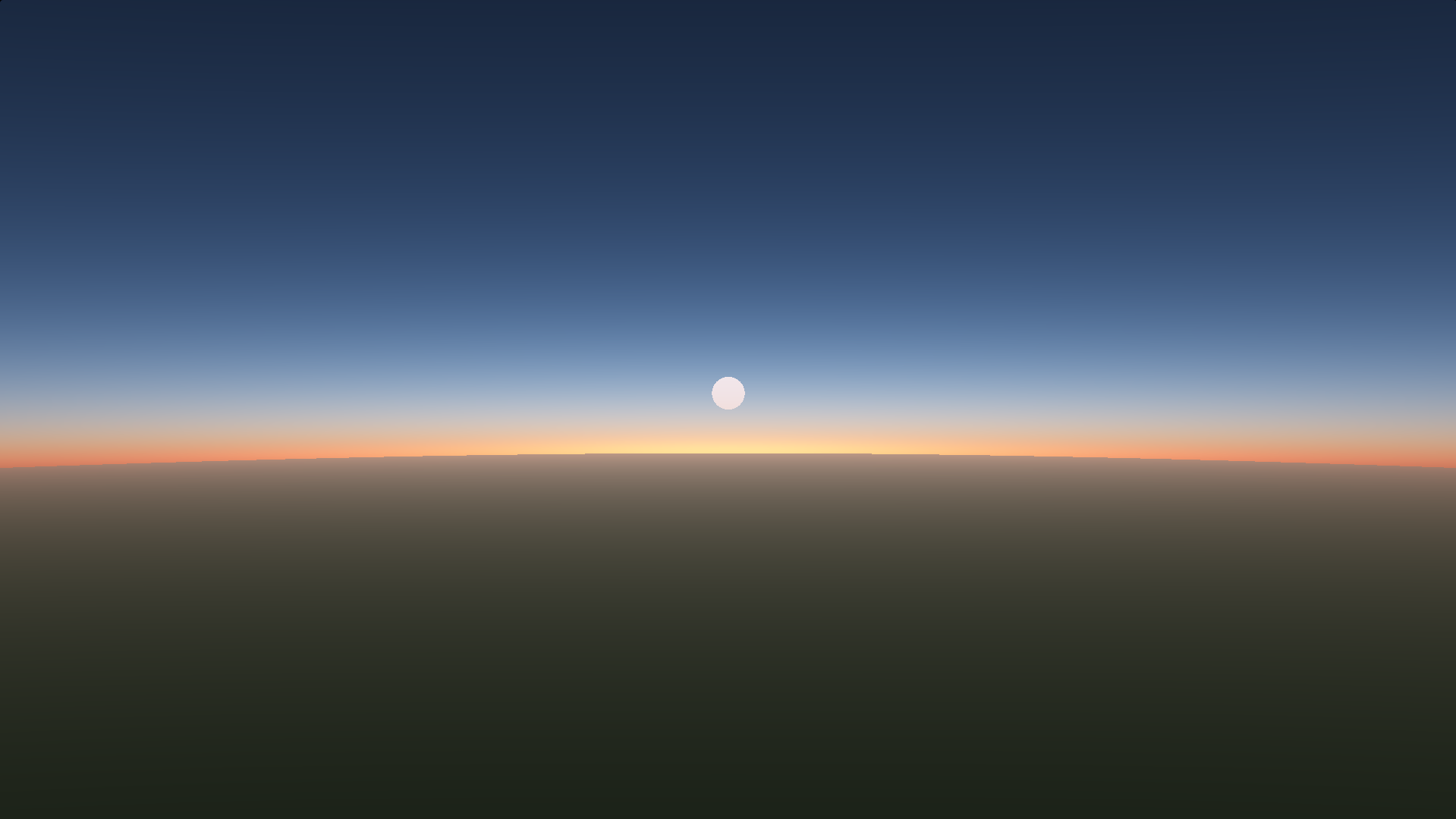
Scattering works by calculating how much light is scattered to the camera on a certain path/
This implementation does that by taking a number of samples across that path to check the amount of light that reaches the path
and it calculates the color of this light from the effects of scattering.

There are two types of scattering, rayleigh and mie
rayleigh is caused by small particles (molecules) and scatters certain colors better than others (causing a blue sky on earth)
mie is caused by bigger particles (like water droplets), and scatters all colors equally, but only in a certain direction.
Mie scattering causes the red sky during the sunset, because it scatters the remaining red light

To know where the ray starts and ends, we need to calculate where the ray enters and exits the atmosphere
We do this using a ray-sphere intersect

The scattering code is based on https://www.scratchapixel.com/lessons/procedural-generation-virtual-worlds/simulating-sky
with some modifications to allow moving the planet, as well as objects inside the atmosphere, correct light absorbsion
from objects in the scene and an ambient scattering term tp light up the dark side a bit if needed

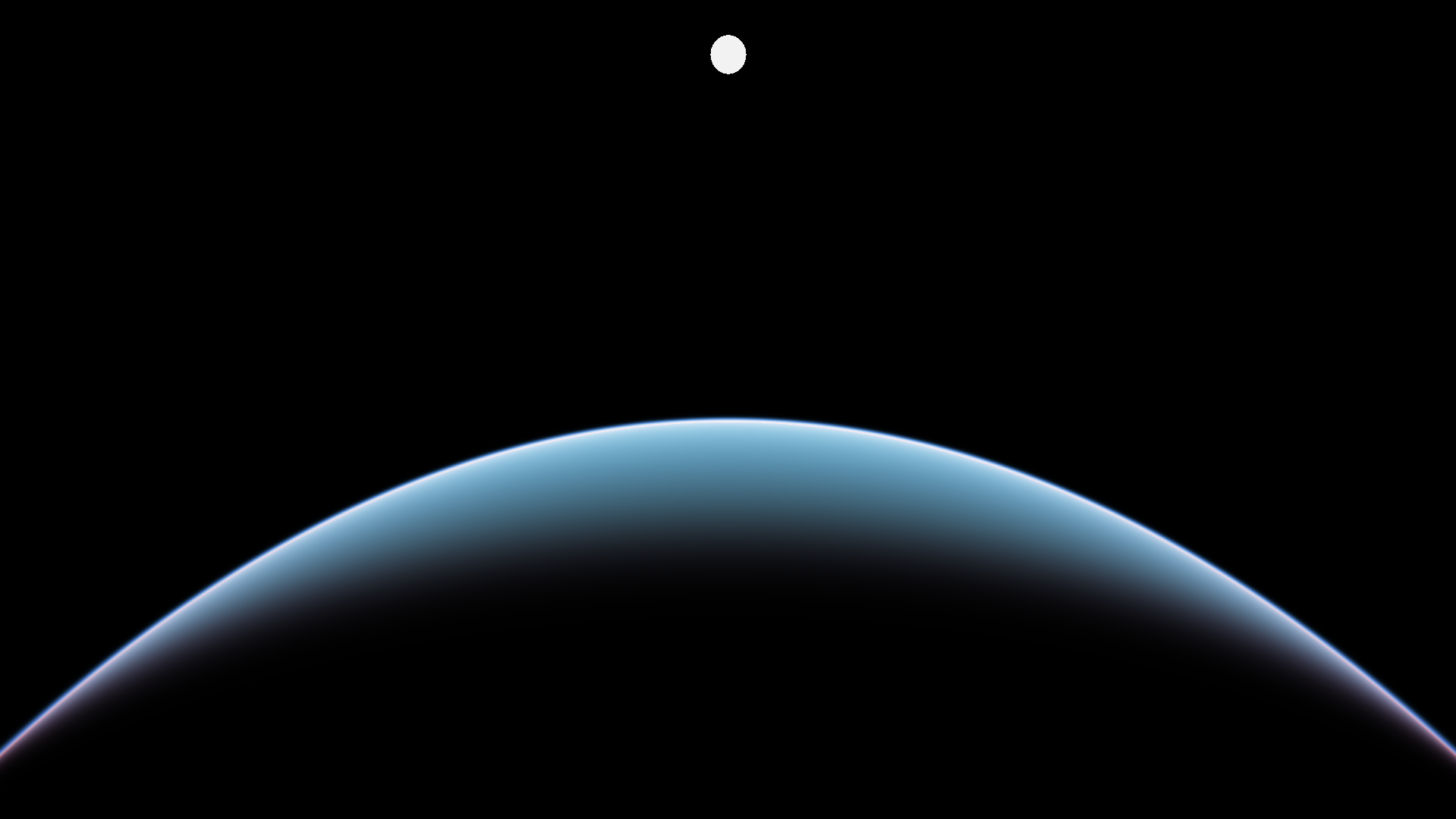
the camera also moves up and down, and the sun rotates around the planet as well

Note: Because rayleigh is a long word to type, I use ray instead on most variable names
      the same goes for position (which becomes pos), direction (which becomes dir) and optical (becomes opt)
*/

// first, lets define some constants to use (planet radius, position, and scattering coefficients)
#define PLANET_POS vec3(0.0) /* the position of the planet */
#define PLANET_RADIUS 6371e3 /* radius of the planet */
#define ATMOS_RADIUS 6471e3 /* radius of the atmosphere */
// scattering coeffs
#define RAY_BETA vec3(5.5e-6, 13.0e-6, 22.4e-6) /* rayleigh, affects the color of the sky */
#define MIE_BETA vec3(21e-6) /* mie, affects the color of the blob around the sun */
#define AMBIENT_BETA vec3(0.0) /* ambient, affects the scattering color when there is no lighting from the sun */
#define ABSORPTION_BETA vec3(2.04e-5, 4.97e-5, 1.95e-6) /* what color gets absorbed by the atmosphere (Due to things like ozone) */
#define G 0.7 /* mie scattering direction, or how big the blob around the sun is */
// and the heights (how far to go up before the scattering has no effect)
#define HEIGHT_RAY 8e3 /* rayleigh height */
#define HEIGHT_MIE 1.2e3 /* and mie */
#define HEIGHT_ABSORPTION 30e3 /* at what height the absorption is at it's maximum */
#define ABSORPTION_FALLOFF 4e3 /* how much the absorption decreases the further away it gets from the maximum height */
// and the steps (more looks better, but is slower)
// the primary step has the most effect on looks
#if HW_PERFORMANCE==0
// edit these if you are on mobile
#define PRIMARY_STEPS 12
#define LIGHT_STEPS 4
#else
// and these on desktop
#define PRIMARY_STEPS 16 /* primary steps, affects quality the most */
#define LIGHT_STEPS 6 /* light steps, how much steps in the light direction are taken */
#endif

// camera mode, 0 is on the ground, 1 is in space, 2 is moving, 3 is moving from ground to space
#define CAMERA_MODE 2

/*
Next we'll define the main scattering function.
This traces a ray from start to end and takes a certain amount of samples along this ray, in order to calculate the color.
For every sample, we'll also trace a ray in the direction of the light,
because the color that reaches the sample also changes due to scattering
*/
vec3 calculate_scattering(
    vec3 start,               // the start of the ray (the camera position)
    vec3 dir,                 // the direction of the ray (the camera vector)
    float max_dist,           // the maximum distance the ray can travel (because something is in the way, like an object)
    vec3 scene_color,         // the color of the scene
    vec3 light_dir,           // the direction of the light
    vec3 light_intensity,     // how bright the light is, affects the brightness of the atmosphere
    vec3 planet_position,     // the position of the planet
    float planet_radius,      // the radius of the planet
    float atmo_radius,        // the radius of the atmosphere
    vec3 beta_ray,            // the amount rayleigh scattering scatters the colors (for earth: causes the blue atmosphere)
    vec3 beta_mie,            // the amount mie scattering scatters colors
    vec3 beta_absorption,     // how much air is absorbed
    vec3 beta_ambient,        // the amount of scattering that always occurs, cna help make the back side of the atmosphere a bit brighter
    float g,                  // the direction mie scatters the light in (like a cone). closer to -1 means more towards a single direction
    float height_ray,         // how high do you have to go before there is no rayleigh scattering?
    float height_mie,         // the same, but for mie
    float height_absorption,  // the height at which the most absorption happens
    float absorption_falloff, // how fast the absorption falls off from the absorption height
    int steps_i,              // the amount of steps along the 'primary' ray, more looks better but slower
    int steps_l               // the amount of steps along the light ray, more looks better but slower
) {
    // add an offset to the camera position, so that the atmosphere is in the correct position
    start -= planet_position;
    // calculate the start and end position of the ray, as a distance along the ray
    // we do this with a ray sphere intersect
    float a = dot(dir, dir);
    float b = 2.0 * dot(dir, start);
    float c = dot(start, start) - (atmo_radius * atmo_radius);
    float d = (b * b) - 4.0 * a * c;

    // stop early if there is no intersect
    if (d < 0.0) return scene_color;

    // calculate the ray length
    vec2 ray_length = vec2(
        max((-b - sqrt(d)) / (2.0 * a), 0.0),
        min((-b + sqrt(d)) / (2.0 * a), max_dist)
    );

    // if the ray did not hit the atmosphere, return a black color
    if (ray_length.x > ray_length.y) return scene_color;
    // prevent the mie glow from appearing if there's an object in front of the camera
    bool allow_mie = max_dist > ray_length.y;
    // make sure the ray is no longer than allowed
    ray_length.y = min(ray_length.y, max_dist);
    ray_length.x = max(ray_length.x, 0.0);
    // get the step size of the ray
    float step_size_i = (ray_length.y - ray_length.x) / float(steps_i);

    // next, set how far we are along the ray, so we can calculate the position of the sample
    // if the camera is outside the atmosphere, the ray should start at the edge of the atmosphere
    // if it's inside, it should start at the position of the camera
    // the min statement makes sure of that
    float ray_pos_i = ray_length.x + step_size_i * 0.5;

    // these are the values we use to gather all the scattered light
    vec3 total_ray = vec3(0.0); // for rayleigh
    vec3 total_mie = vec3(0.0); // for mie

    // initialize the optical depth. This is used to calculate how much air was in the ray
    vec3 opt_i = vec3(0.0);

    // also init the scale height, avoids some vec2's later on
    vec2 scale_height = vec2(height_ray, height_mie);

    // Calculate the Rayleigh and Mie phases.
    // This is the color that will be scattered for this ray
    // mu, mumu and gg are used quite a lot in the calculation, so to speed it up, precalculate them
    float mu = dot(dir, light_dir);
    float mumu = mu * mu;
    float gg = g * g;
    float phase_ray = 3.0 / (50.2654824574 /* (16 * pi) */) * (1.0 + mumu);
    float phase_mie = allow_mie ? 3.0 / (25.1327412287 /* (8 * pi) */) * ((1.0 - gg) * (mumu + 1.0)) / (pow(1.0 + gg - 2.0 * mu * g, 1.5) * (2.0 + gg)) : 0.0;

    // now we need to sample the 'primary' ray. this ray gathers the light that gets scattered onto it
    for (int i = 0; i < steps_i; ++i) {

        // calculate where we are along this ray
        vec3 pos_i = start + dir * ray_pos_i;

        // and how high we are above the surface
        float height_i = length(pos_i) - planet_radius;

        // now calculate the density of the particles (both for rayleigh and mie)
        vec3 density = vec3(exp(-height_i / scale_height), 0.0);

        // and the absorption density. this is for ozone, which scales together with the rayleigh,
        // but absorbs the most at a specific height, so use the sech function for a nice curve falloff for this height
        // clamp it to avoid it going out of bounds. This prevents weird black spheres on the night side
        float denom = (height_absorption - height_i) / absorption_falloff;
        density.z = (1.0 / (denom * denom + 1.0)) * density.x;

        // multiply it by the step size here
        // we are going to use the density later on as well
        density *= step_size_i;

        // Add these densities to the optical depth, so that we know how many particles are on this ray.
        opt_i += density;

        // Calculate the step size of the light ray.
        // again with a ray sphere intersect
        // a, b, c and d are already defined
        a = dot(light_dir, light_dir);
        b = 2.0 * dot(light_dir, pos_i);
        c = dot(pos_i, pos_i) - (atmo_radius * atmo_radius);
        d = (b * b) - 4.0 * a * c;

        // no early stopping, this one should always be inside the atmosphere
        // calculate the ray length
        float step_size_l = (-b + sqrt(d)) / (2.0 * a * float(steps_l));

        // and the position along this ray
        // this time we are sure the ray is in the atmosphere, so set it to 0
        float ray_pos_l = step_size_l * 0.5;

        // and the optical depth of this ray
        vec3 opt_l = vec3(0.0);

        // now sample the light ray
        // this is similar to what we did before
        for (int l = 0; l < steps_l; ++l) {

            // calculate where we are along this ray
            vec3 pos_l = pos_i + light_dir * ray_pos_l;

            // the heigth of the position
            float height_l = length(pos_l) - planet_radius;

            // calculate the particle density, and add it
            // this is a bit verbose
            // first, set the density for ray and mie
            vec3 density_l = vec3(exp(-height_l / scale_height), 0.0);

            // then, the absorption
            float denom = (height_absorption - height_l) / absorption_falloff;
            density_l.z = (1.0 / (denom * denom + 1.0)) * density_l.x;

            // multiply the density by the step size
            density_l *= step_size_l;

            // and add it to the total optical depth
            opt_l += density_l;

            // and increment where we are along the light ray.
            ray_pos_l += step_size_l;
        }

        // Now we need to calculate the attenuation
        // this is essentially how much light reaches the current sample point due to scattering
        vec3 attn = exp(-beta_ray * (opt_i.x + opt_l.x) - beta_mie * (opt_i.y + opt_l.y) - beta_absorption * (opt_i.z + opt_l.z));

        // accumulate the scattered light (how much will be scattered towards the camera)
        total_ray += density.x * attn;
        total_mie += density.y * attn;

        // and increment the position on this ray
        ray_pos_i += step_size_i;
    }

    // calculate how much light can pass through the atmosphere
    vec3 opacity = exp(-(beta_mie * opt_i.y + beta_ray * opt_i.x + beta_absorption * opt_i.z));

    // calculate and return the final color
    return (
        phase_ray * beta_ray * total_ray // rayleigh color
        + phase_mie * beta_mie * total_mie // mie
        + opt_i.x * beta_ambient // and ambient
    ) * light_intensity + scene_color * opacity; // now make sure the background is rendered correctly
}

/*
A ray-sphere intersect
This was previously used in the atmosphere as well, but it's only used for the planet intersect now, since the atmosphere has this
ray sphere intersect built in
*/

vec2 ray_sphere_intersect(
    vec3 start, // starting position of the ray
    vec3 dir, // the direction of the ray
    float radius // and the sphere radius
) {
    // ray-sphere intersection that assumes
    // the sphere is centered at the origin.
    // No intersection when result.x > result.y
    float a = dot(dir, dir);
    float b = 2.0 * dot(dir, start);
    float c = dot(start, start) - (radius * radius);
    float d = (b*b) - 4.0*a*c;
    if (d < 0.0) return vec2(1e5,-1e5);
    return vec2(
        (-b - sqrt(d))/(2.0*a),
        (-b + sqrt(d))/(2.0*a)
    );
}

/*
To make the planet we're rendering look nicer, we implemented a skylight function here

Essentially it just takes a sample of the atmosphere in the direction of the surface normal
*/
vec3 skylight(vec3 sample_pos, vec3 surface_normal, vec3 light_dir, vec3 background_col) {

    // slightly bend the surface normal towards the light direction
    surface_normal = normalize(mix(surface_normal, light_dir, 0.6));

    // and sample the atmosphere
    return calculate_scattering(
        sample_pos,         // the position of the camera
        surface_normal,     // the camera vector (ray direction of this pixel)
        3.0 * ATMOS_RADIUS, // max dist, since nothing will stop the ray here, just use some arbitrary value
        background_col,     // scene color, just the background color here
        light_dir,          // light direction
        vec3(40.0),         // light intensity, 40 looks nice
        PLANET_POS,         // position of the planet
        PLANET_RADIUS,      // radius of the planet in meters
        ATMOS_RADIUS,       // radius of the atmosphere in meters
        RAY_BETA,           // Rayleigh scattering coefficient
        MIE_BETA,           // Mie scattering coefficient
        ABSORPTION_BETA,    // Absorbtion coefficient
        AMBIENT_BETA,       // ambient scattering, turned off for now. This causes the air to glow a bit when no light reaches it
        G,                  // Mie preferred scattering direction
        HEIGHT_RAY,         // Rayleigh scale height
        HEIGHT_MIE,         // Mie scale height
        HEIGHT_ABSORPTION,  // the height at which the most absorption happens
        ABSORPTION_FALLOFF, // how fast the absorption falls off from the absorption height
        LIGHT_STEPS,        // steps in the ray direction
        LIGHT_STEPS         // steps in the light direction
    );
}

/*
The following function returns the scene color and depth
(the color of the pixel without the atmosphere, and the distance to the surface that is visible on that pixel)

in this case, the function renders a green sphere on the place where the planet should be
color is in .xyz, distance in .w

I won't explain too much about how this works, since that's not the aim of this shader
*/
vec4 render_scene(vec3 pos, vec3 dir, vec3 light_dir) {

    // the color to use, w is the scene depth
    vec4 color = vec4(0.0, 0.0, 0.0, 1e12);

    // add a sun, if the angle between the ray direction and the light direction is small enough, color the pixels white
    color.xyz = vec3(dot(dir, light_dir) > 0.9998 ? 3.0 : 0.0);

    // get where the ray intersects the planet
    vec2 planet_intersect = ray_sphere_intersect(pos - PLANET_POS, dir, PLANET_RADIUS);

    // if the ray hit the planet, set the max distance to that ray
    if (0.0 < planet_intersect.y) {
        color.w = max(planet_intersect.x, 0.0);

        // sample position, where the pixel is
        vec3 sample_pos = pos + (dir * planet_intersect.x) - PLANET_POS;

        // and the surface normal
        vec3 surface_normal = normalize(sample_pos);

        // get the color of the sphere
        color.xyz = vec3(0.0, 0.25, 0.05);

        // get wether this point is shadowed, + how much light scatters towards the camera according to the lommel-seelinger law
        vec3 N = surface_normal;
        vec3 V = -dir;
        vec3 L = light_dir;
        float dotNV = max(1e-6, dot(N, V));
        float dotNL = max(1e-6, dot(N, L));
        float shadow = dotNL / (dotNL + dotNV);

        // apply the shadow
        color.xyz *= shadow;

        // apply skylight
        color.xyz += clamp(skylight(sample_pos, surface_normal, light_dir, vec3(0.0)) * vec3(0.0, 0.25, 0.05), 0.0, 1.0);
    }

    return color;
}

/*
next, we need a way to do something with the scattering function

to do something with it we need the camera vector (which is the ray direction) of the current pixel
this function calculates it
*/
vec3 get_camera_vector(vec3 resolution, vec2 coord) {
    vec2 uv    = coord.xy / resolution.xy - vec2(0.5);
         uv.x *= resolution.x / resolution.y;

    return normalize(vec3(uv.x, uv.y, -1.0));
}

/*
Finally, draw the atmosphere to screen

we first get the camera vector and position, as well as the light dir
*/
void mainImage(out vec4 fragColor, in vec2 fragCoord) {

    // get the camera vector
    vec3 camera_vector = get_camera_vector(iResolution, fragCoord);

    // get the camera position, switch based on the defines
#if CAMERA_MODE==0
    vec3 camera_position = vec3(0.0, PLANET_RADIUS + 100.0, 0.0);
#endif
#if CAMERA_MODE==1
    vec3 camera_position = vec3(0.0, ATMOS_RADIUS , ATMOS_RADIUS);
#endif
#if CAMERA_MODE==2
    vec3 camera_position = vec3(0.0, ATMOS_RADIUS + (-cos(iTime / 2.0) * (ATMOS_RADIUS - PLANET_RADIUS - 1.0)), 0.0);
#endif
#if CAMERA_MODE==3
    float offset = (1.0 - cos(iTime / 2.0)) * ATMOS_RADIUS;
    vec3 camera_position = vec3(0.0, PLANET_RADIUS + 1.0, offset);
#endif
    // get the light direction
    // also base this on the mouse position, that way the time of day can be changed with the mouse
    vec3 light_dir = iMouse.y == 0.0 ?
        normalize(vec3(0.0, cos(-iTime/8.0), sin(-iTime/8.0))) :
        normalize(vec3(0.0, cos(iMouse.y * -5.0 / iResolution.y), sin(iMouse.y * -5.0 / iResolution.y)));

    // get the scene color and depth, color is in xyz, depth in w
    // replace this with something better if you are using this shader for something else
    vec4 scene = render_scene(camera_position, camera_vector, light_dir);

    // the color of this pixel
    vec3 col = vec3(0.0);//scene.xyz;

    // get the atmosphere color
    col += calculate_scattering(
        camera_position,    // the position of the camera
        camera_vector,      // the camera vector (ray direction of this pixel)
        scene.w,            // max dist, essentially the scene depth
        scene.xyz,          // scene color, the color of the current pixel being rendered
        light_dir,          // light direction
        vec3(40.0),         // light intensity, 40 looks nice
        PLANET_POS,         // position of the planet
        PLANET_RADIUS,      // radius of the planet in meters
        ATMOS_RADIUS,       // radius of the atmosphere in meters
        RAY_BETA,           // Rayleigh scattering coefficient
        MIE_BETA,           // Mie scattering coefficient
        ABSORPTION_BETA,    // Absorbtion coefficient
        AMBIENT_BETA,       // ambient scattering, turned off for now. This causes the air to glow a bit when no light reaches it
        G,                  // Mie preferred scattering direction
        HEIGHT_RAY,         // Rayleigh scale height
        HEIGHT_MIE,         // Mie scale height
        HEIGHT_ABSORPTION,  // the height at which the most absorption happens
        ABSORPTION_FALLOFF, // how fast the absorption falls off from the absorption height
        PRIMARY_STEPS,      // steps in the ray direction
        LIGHT_STEPS         // steps in the light direction
    );

    // apply exposure, removing this makes the brighter colors look ugly
    // you can play around with removing this
    col = 1.0 - exp(-col);


    // Output to screen
    fragColor = vec4(col, 1.0);
}
Raymarching
This is classic volumetric raymarching, but I wrote the shader in a way to try and explain it as clearly as possible. It's not the most advanced shader ever, with the more notable feature of this shader being it's ozone layer. More modern approaches precompute part of the optical depth, to replace a number of raymarching steps with texture lookups to improve performance, as well as adding multiple scattering.
I did try to experiment with hacking in multiple scattering with rough approximations, but it didn't work
Approximation?
I've also experimented with trying to find an approximation to the optical depth, or calculating the lookup textures for the precomputed ones directly instead of using raymarching.
In the book GPU Pro 3, there's an article on atmospheric scattering that replaces the optical depth calculation with the Chapman function, which means there's only one loop instead of two nested loops in the shader.
I'm interested in also trying to remove that loop, and simply getting one formula to calculate the result directly. I believe it is possible as I've managed to find a few more approximations to the optical depth.
A promising one here is $T = 2 \exp(-x) (2 - \exp(-x))$ where $x$ is the distance of the ray to the center of the atmosphere. This approximation works best for the full ray, so doesn't work nicely from the surface, but it's quite accurate.
Machine Learning
In the end, I think it would be worth it to write a reference path tracer, and use symbolic regression, or some other ML tool to figure out a more accurate formula to the entire calculation.
I want to do this eventually, but I'd first need to write a proper volumetric path tracer. It will likely also be hard to figure out how the resulting formula actually comes to the results.